PayloopPayloop
CommunityVoicesToolsDiscoverLeaderboardReportsBlog
Save Up to 65% on AI
Powered by Payloop — LLM Cost Intelligence
Tools/Vizcom/vs Canva AI
Vizcom

Vizcom

ai-design
vs
Canva AI

Canva AI

ai-design

Vizcom vs Canva AI — Comparison

8 integrations6 featuresSeries B
Pain: 1/10015 integrations8 featuresOther
The Bottom Line

Vizcom excels in AI-driven design capabilities for industrial applications, offering seamless transitions from sketches to photorealistic 3D designs. In contrast, Canva AI stands out with its ease of use and extensive integrations, making it ideal for marketing and social media graphic creation. Vizcom has gathered positive reviews for its innovative features despite a less intuitive interface, while Canva AI benefits from broad user acceptance and less vocalized criticism of its pricing, supported by its significant funding of $992.9M.

Best for

Vizcom is the better choice when focusing on rapid prototyping and enhancing productivity for industrial product design teams.

Best for

Canva AI is the better choice when designing versatile marketing materials and social media graphics for larger teams, thanks to its seamless integration capabilities and user-friendly interface.

Key Differences

  • 1.Vizcom is specifically designed for industrial design with extensive 3D visualization capabilities, while Canva AI focuses on general design needs with AI-powered design suggestions.
  • 2.Canva AI supports integration with popular social media and content platforms, whereas Vizcom integrates with industry tools like AutoCAD and SolidWorks.
  • 3.Vizcom has a workforce of 68 employees and ventures in the B2B sector, whereas Canva AI, with about 5500 employees, has a broader consumer focus.
  • 4.Vizcom offers a tiered pricing strategy with a free version, appealing to startups, compared to more features-driven pricing of Canva AI.
  • 5.Canva AI, backed by nearly $1 billion in funding, signals robust scalability and continuous feature enhancements.

Verdict

Engineering teams focused on complex industrial design should opt for Vizcom due to its specific 3D visualization capabilities and industry integrations. Conversely, Canva AI is better suited for organizations aiming to streamline marketing and communication design workflows, thanks to its wide array of design features and platform integrations. While Vizcom has room for interface improvements, Canva AI offers strong ease of use and community support.

Overview
What each tool does and who it's for

Vizcom

AI-powered design tool for real world product designers and their teams. Go from sketch to photorealistic 3D render in seconds. Start creating for fre

Users generally appreciate Vizcom for its powerful AI-driven design capabilities, highlighting its ability to streamline creative workflows and enhance productivity. However, some key complaints center around occasional glitches and a less intuitive user interface that can be challenging for newcomers. Opinions on pricing are mixed, with some users finding it reasonable for the features offered, while others feel it could be more competitive. Overall, Vizcom has a positive reputation for its innovative approach, though there's room for improvement in user experience and occasional technical issues.

Canva AI

Canva AI is praised for its seamless integration with other platforms like Claude Design, allowing for frictionless idea generation and editing, and its comprehensive updates that enhance design workflows. Users are excited about new features like gpt-image-2 and enhancements in animation and editing. However, specific user complaints are not prominently mentioned in the social sentiment. Pricing sentiment is not directly addressed, indicating it might not be a significant factor in discussions. Overall, Canva AI enjoys a strong reputation for innovation and versatility as a design tool.

Key Metrics
—
Mentions (30d)
37
Mention Velocity
How discussion volume is trending week-over-week

Vizcom

Not enough data

Canva AI

-90% vs last week
Where People Discuss
Mention distribution across platforms

Vizcom

YouTube
100%

Canva AI

Twitter/X
73%
Reddit
24%
YouTube
3%
Community Sentiment
How developers feel about each tool based on mentions and reviews

Vizcom

0% positive100% neutral0% negative

Canva AI

4% positive96% neutral0% negative
Pricing

Vizcom

usage-based + subscription + per-seat + tieredFree tier

Pricing found: $0/ per, $49/ per, $0/ per

Canva AI

Use Cases
When to use each tool

Vizcom (8)

Rapid prototyping for product designCollaborative brainstorming sessions for creative teamsVisualizing complex industrial designs in 3DCreating interactive presentations for client pitchesStreamlining the feedback process with real-time design updatesEnhancing user experience through immersive design simulationsFacilitating design iterations based on user testingIntegrating AI-driven insights into design decisions

Canva AI (6)

Creating social media graphicsDesigning marketing materialsDeveloping presentations and slidesMaking infographics and data visualizationsCrafting event invitations and flyersProducing business cards and stationery
Features

Only in Vizcom (6)

Vizcom x O'NEALDesign Decoded: Dennis TanDesign Decoded: Dennis MuellerDesign Decoded: Scott RobertsonDesign Decoded: Robert MunsonMake it Real

Only in Canva AI (8)

AI-powered design suggestionsMagic Resize for different formatsBackground remover toolText suggestions and auto-formattingImage enhancement and filtersCollaboration tools for team projectsTemplate customization with AIBrand kit for consistent branding
Integrations

Only in Vizcom (8)

AutoCADSolidWorksAdobe Creative CloudSketchFigmaBlenderUnityMiro

Only in Canva AI (15)

Google DriveDropboxSlackMailchimpHubSpotWordPressInstagramFacebookYouTubePinterestZapierTrelloAsanaShopifyZoom
Pain Points
Top complaints from reviews and social mentions

Vizcom

No complaints found

Canva AI

token usage (1)
Top Discussion Keywords
Most mentioned keywords from community discussions

Vizcom

No data

Canva AI

token usage (1)
Latest Videos
Recent uploads from official YouTube channels

Vizcom

How to Extract and Control Components in Automotive Interiors

How to Extract and Control Components in Automotive Interiors

Apr 9, 2026

Most ideas die in sketchbooks, this one became a concrete keyboard.

Most ideas die in sketchbooks, this one became a concrete keyboard.

Apr 7, 2026

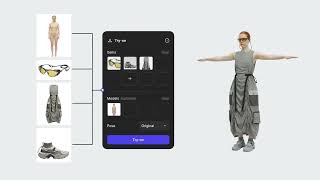
A render is only the beginning: Introducing Extract, Try On & Export

A render is only the beginning: Introducing Extract, Try On & Export

Mar 31, 2026

How to Export Editable Meshes from Vizcom

How to Export Editable Meshes from Vizcom

Mar 25, 2026

Canva AI

No YouTube channel

Product Screenshots

Vizcom

Vizcom screenshot 1Vizcom screenshot 2Vizcom screenshot 3Vizcom screenshot 4

Canva AI

No screenshots

What People Talk About
Most discussed topics from community mentions

Vizcom

Canva AI

support10
pricing7
migration4
documentation3
cost optimization2
scalability2
model selection1
ease of use1
Top Community Mentions
Highest-engagement mentions from the community

Vizcom

Vizcom AI

Vizcom AI

YouTubeneutral source

Canva AI

Introducing our new collaboration with Anthropic: Canva is now in Claude Design! Generate ideas in Claude. Edit in Canva. No friction. No starting from scratch. https://t.co/f220BR4AZk https://t.co/t

Introducing our new collaboration with Anthropic: Canva is now in Claude Design! Generate ideas in Claude. Edit in Canva. No friction. No starting from scratch. https://t.co/f220BR4AZk https://t.co/tLHHLd1rO3

Twitter/Xby @canva source
Company Intel
design
Industry
information technology & services
68
Employees
5,500
$52.0M
Funding
$992.9M
Series B
Stage
Other
Supported Languages & Categories

Only in Vizcom (2)

FinTechSecurity
Frequently Asked Questions
Is Vizcom or Canva AI better for creating photorealistic 3D renders?▼

Vizcom is better suited for creating photorealistic 3D renders due to its AI-powered transitions from sketches to 3D models.

How does Vizcom pricing compare to Canva AI?▼

Vizcom uses a tiered pricing model with a free tier and is perceived to be reasonable by many users, while Canva AI does not prominently feature pricing discussions but focuses on delivering integrated design experiences.

Which has better community support, Vizcom or Canva AI?▼

Canva AI likely has broader community support due to its larger user base and substantial funding, enabling ongoing improvements and responsive updates.

Can Vizcom and Canva AI be used together?▼

Yes, they can be used together as they serve different design needs, with Vizcom focusing on industrial applications and Canva AI on marketing and graphic design.

Which is easier to get started with, Vizcom or Canva AI?▼

Canva AI is easier to get started with due to its intuitive design interface and strong user-centric features, making it accessible even to novices.

View Vizcom Profile View Canva AI Profile