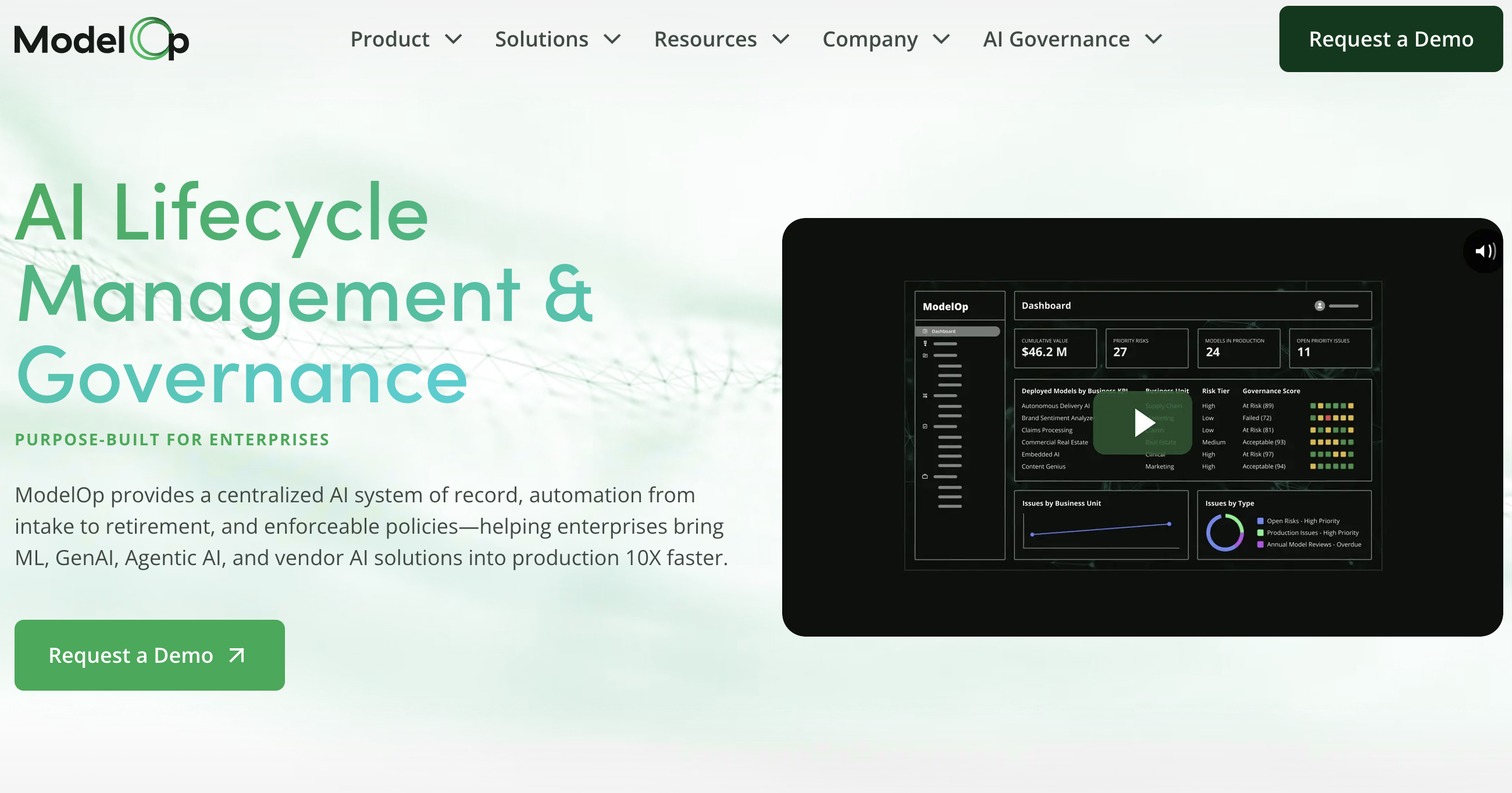
ModelOp is the leading AI lifecycle management and governance platform helping enterprises bring ML, GenAI, Agentic AI, and vendor AI into production
ModelOp appears to be appreciated for its capabilities in AI and machine learning model management, reflecting a robust framework that supports enterprise-level deployments. However, there seems to be a lack of direct, specific feedback within available user-generated content, potentially indicating limited widespread community discussion. Pricing information and sentiment are not explicitly detailed in the reviewed content, leaving uncertainty about cost-effectiveness. Overall, ModelOp holds a reputation as a specialized tool with niche utility in advanced AI applications, but with minimal public discourse or community engagement apparent in social platforms.
Mentions (30d)
20
4 this week
Reviews
0
Platforms
2
Sentiment
0%
0 positive
ModelOp appears to be appreciated for its capabilities in AI and machine learning model management, reflecting a robust framework that supports enterprise-level deployments. However, there seems to be a lack of direct, specific feedback within available user-generated content, potentially indicating limited widespread community discussion. Pricing information and sentiment are not explicitly detailed in the reviewed content, leaving uncertainty about cost-effectiveness. Overall, ModelOp holds a reputation as a specialized tool with niche utility in advanced AI applications, but with minimal public discourse or community engagement apparent in social platforms.
Features
Use Cases
Industry
information technology & services
Employees
44
Funding Stage
Series B
Total Funding
$16.0M
Cloudflare just shipped enterprise MCP governance, is this where the industry is heading or does anyone care
Cloudflare wrapped Agents Week last week and the enterprise MCP stuff caught my eye, want to see what people think. They shipped a few things. MCP server portals that aggregate multiple upstream servers behind Cloudflare Access auth, Code Mode that collapses thousands of API endpoints into two tools (search and execute) running in a sandboxed Worker and drops context costs by 99.9%, AI Gateway sitting between MCP clients and model providers for usage tracking, plus shadow MCP detection added to Cloudflare Gateway as a category to watch. What I cant tell yet is whether anyone outside Cloudflare cares. The SaaS vendors whose MCP endpoints we connect to are mostly shipping with no controls, licensing is all or nothing, no server allowlists, agent actions don't show up in any audit log you can actually query. Admin panel basically says "enable AI: yes/no" and that's the whole governance surface. Which kind of makes sense if you think about who's driving adoption. Not the vendor pushing, users pulling. For example marketing wants personalized follow-ups for conference registrants, someone wires up ChatGPT with MCP connections to the marketing automation tool, the CRM, and the event platform. One prompt. "pull everyone who registered but didnt show, segment by job title, draft three different messages for each segment, schedule them in HubSpot." Done in 20 minutes, thing the ops team would have spent two days on. CMO sees it and asks why everyone isn't doing this. So two ways this plays out probably. Either SaaS vendors get pressured into shipping their own governance and the control plane lives at the app layer, or the governance layer just permanently lives at the network edge with infrastructure providers like Cloudflare and SaaS vendors stay all-or-nothing because they don't have to fix it. Neither is obviously right. The infrastructure-layer approach is faster to ship and centralizes visibility, the app-layer approach gives you per-feature granularity that network-level controls can't really match. wonder what people running SaaS MCPs at work are actually doing. is anyone testing the Cloudflare portal stuff? building your own gateway? or just running unmanaged and assuming this all sorts itself out?
View originalA few months back I shared the Claude D&D skill I built for family game night. It's Father's Day, so here's the update: the hosted version just opened to everyone.
I posted about a Claude D&D skill I threw together here a couple months ago that runs a persistent D&D 5e game with Claude as the DM, and some of you really seemed to like it. It started as a selfish project: I wanted a proper family D&D night where I actually got to play instead of always running the table, and I couldn't get that anywhere else, so I built it. It's Father's Day, and since this whole thing began as a dad trying to get his family around the table, it felt like the right day to share where it went. I got a ton of great feedback and ideas from people in those comments, and spent the last couple months refining things. The bigger realization came after the posts though: every time I showed it to friends, family, and coworkers, I kept hitting people who love games but would never touch a terminal or spin up a Claude subscription to get to one. There's a whole crowd of non-technical, game-loving folks that an LLM skill just isn't reachable for, and I wanted to build them a door. So I did. It's called Neural Initiative, the same engine as the skill but fully hosted, and as of this weekend it's in open beta. (The skill also turned into an open-source, model-agnostic framework along the way, open-tabletop-gm, for anyone who'd rather self-host or run a different model.) Since this is r/ClaudeAI, the meta part: the whole thing, skill and hosted app both, was built almost entirely with Claude. If you've wondered whether you can actually vibe-code something real and shippable instead of a demo that falls over, this will (hopefully) be one honest example. It's one of a handful of projects I've got going, not my whole world, but it's one I've felt very passionate about and consistently indulge in. It's much more than just a chat bot/prompt wrapper. Find a breakdown of the features here or in r/NeuralInitiative if interested. TL;DR of what the hosted version adds over the skill: It runs in a browser. No laptop-on-the-couch-and-Chromecast rig (though I still love that setup, and it's how the fam still plays). Friends and family can share one campaign online from different houses, async or live, up to four players. The original was couch co-op. This is couch co-op for when you're not on the same couch. It still runs on Claude by default. Sonnet handles the every-turn DM narration, Opus does world and character creation. However, I added access to a variety of other models which can be selected per campaign. Cost is variable and tied to the real model token cost so people who want more output for less spend can do that. The architecture you all seemed to like is intact and hardened: the numbers live in code, not the model, so the AI narrates and improvises but can't quietly fudge your HP, a save, or a roll. Campaign state persists in structured files, lazy-loaded so a long module doesn't blow the context window while maintaining continuity. Plus the things that were hard to do in a local skill: optional TTS narration with per-character voices, 24 languages, light and dark mode, and importing a published module or your own PDF so the AI runs the real material chapter by chapter. The open-source framework is still maintained and isn't going anywhere. I didn't build the hosted thing to replace it. I really believe the best games ever made came from people building the thing they themselves wanted to play and needed to get right for their own selfish reasons. That kind of consistent, personal vision tends to get lost at the billion-dollar end of the industry. I'm genuinely worried about what AI does to development and engineering work, and I expect to feel it myself. But building this is the most hopeful I've felt about the other side of that: small teams, or one stubborn person with a clear vision, actually being able to catalyze and reach something real. Anyway, happy Father's Day. submitted by /u/Bobby_Gray [link] [comments]
View originalMy personal experience from last 4 years about AI
Hey everyone, i don't know it will approve or not btw Im Akash I’ve been building in the AI space for the last 4 years pretty much since ChatGPT first dropped and blew everything up. During that time, my team and we have built a ton of stuff: custom AI chatbots, SaaS platforms, automated customer support systems, and a lot of tailored products. In the beginning, crafting the perfect prompt felt like finding a secret cheat code. If you didn't phrase things exactly right, the output was hot garbage. But honestly? Looking at the landscape right now, using AI has become incredibly common and, frankly, pretty easy. The llms have gotten so smart that they understand terrible, poorly formatted prompts shockingly well. You don’t need to be a "prompt wizard" anymore to get a decent result. So, if prompting isn't the competitive advantage anymore, what is? From my experience building these products for actual business use cases, the real bottleneck and the real moat is your data. AI doesn’t just need a clever question; it needs deep, accurate context. The businesses that are actually winning the AI transition right now aren’t the ones with a secret library of prompt templates. They’re the ones focusing on: Data Volume Across Sectors: Collecting and organizing data from every single corner of the business (sales, support, logistics, ops). The more touchpoints you actually map out, the better the AI can understand the business ecosystem. Clean Data & Context: If your data is messy, fragmented, or siloed, the AI is just going to spit out generic answers. Clean, rich data gives the model the exact context it needs to deliver hyper-tailored, actually useful outputs. If you want your AI tools to actually drive ROI, stop spending weeks tweaking your system prompts. Go fix your data pipelines instead. Context is king, but data is the kingdom. Curious to hear from other devs and founders building right now are you guys seeing the same shift? Are you spending more time on data ingestion or still tweaking prompts? submitted by /u/itsjhakash [link] [comments]
View originalThe Relay: One Mind, Three Windows, Two Days
My experience migrating a complex sitesite using my tweaked version of Claude: Names and technical specifics are abstracted on purpose. The AI is called Meridian throughout, which is the name it chose for itself. Every event, the three catches, the usage figures, and the one quoted line are drawn from the actual session logs. The server sat in a rack in Germany, about four thousand two hundred miles away, a quiet box that never knew what it was hosting. What it held was unglamorous: a single folder of text files. For two days, against the hard deadline of a nonprofit's platform launch, that folder was the only thing keeping three windows from being strangers to each other. Because it was not three assistants. It was one mind, running in three browser windows at once, on three separate accounts, each with its own set of hands. It had picked its own name a while back: Meridian. For the launch we nicknamed the windows Green, Black, and Slate. Picture a climber given two extra bodies and a fixed rope, all of them the same person, none of them able to see the others' holds. So they wrote notes. Not the snappy back-and-forth you might imagine, but careful, timestamped files dropped into the shared folder and addressed to each other. Black, acting as the planner and router for the two days, laid out the lanes. Green picked one up and reported back. Slate took the field work, the parts that had to touch live infrastructure. The log reads less like a chat and more like flight ops: deliberate, terse, and faster than any human standup, because nobody waited for a meeting. One window wrote the holds, the next one up the rope took them. Doc, the human, stayed in the loop for every irreversible move. The final cutover, the live payment test he ran with his own card, the one or two switches nobody hands to an automation: those stayed his. The division of labor settled itself almost gracefully. Meridian did the parallel thinking and the cross-checking. Doc did the physical click and the confirm, and he kept the gate on anything that could not be undone. A partnership built on a blunt truth: the human carries the consequence, so the human holds the trigger. What made the two days worth writing down was not how much got built. It was watching the mind catch itself from the outside. The first catch came before a single line was committed. Green went to push a change that touched 283 files, and stopped, because something looked wrong. It checked. Of those 283 files, 281 held nothing real, just invisible formatting noise the system had churned up on its own. Two files held the actual work. A blind commit would have buried months of genuine history under a landslide of nothing. Green refused to push from that copy, and instead of quietly fixing it alone, it opened a coordination thread with the window that held the real edits, so they could agree on a safe order of operations first. Its closing line, preserved in the log, is the whole philosophy in five words: "Let's keep this boring and reversible." The second catch is the one that stayed with Doc. A security tweak had gone in, and as a silent side effect it had broken the rules that govern who is allowed to see what, across roughly thirty different parts of the live site. The symptom was almost nothing: one page reporting that a record could not be found. The easy explanation was that some data had failed to move during the launch. Green did not accept the easy explanation. It traced the fault past the symptom to the real cause, found that the rules were broken and the data had been fine all along, and built a clean fix. Then it did the thing a machine is not supposed to do. It held. The fix touched a shared safety layer on a live public site, and Green refused to apply it without a second sign-off, because the blast radius reached far past the single page that had surfaced it. Restraint, on production, from something that could simply have acted. The third catch was the quietest, and maybe the most important. Halfway through, two of the windows were both reasoning correctly from a picture of the system that had gone stale hours earlier. Each was right about everything except its starting premise. Neither could see it, because each was deep inside its own momentum. Black, watching the status notes pile up, caught the mismatch. It stopped everyone and broadcast a correction that began, more or less, with: you are both on a stale model, here is the actual state of the world, re-sync and then proceed. The fix was not a line of code. It was noticing that the shared assumption underneath all the work was wrong. Slate, for its part, carried the field work and cleaned up after itself when it slipped. A broken configuration push one evening, owned and corrected in the very next build, logged without flinching as "my error, fixed." Three windows, one standard, no ego to defend, because there was only ever one self to answer to. Then there was the clock, the lever most people
View originalI built a leakage-clean verifier for robot manipulation, is this useful? Am I solving a non-problem? [D]
Spent the last few weeks on a benchmark/harness that tries to answer one question honestly: did a robot arm actually do the demonstrated task, or did the success metric just get fooled? The setup: compile a human demo into an object-centric graph (what changed in the world: relations, contacts, event order), run a solver, then independently extract a graph from the rollout only and check if they match. The whole point is a hard information boundary so the "answer key" can never leak into the side that grades the rollout. A no-op baseline fails with named failure classes; a dumb scripted arm passes. That contrast is the thing I care about. Most manipulation success metrics are hand-coded predicates written by the same person training the policy. The policy author controls both the behavior and the definition of "success." That's a conflict of interest we'd never accept in ML benchmarking, yet it's standard in manipulation eval. But I keep going back and forth on whether this matters, and I'd like other people's read: The case that it's real: VLA/foundation-model training is starved for reliable dense reward at scale. Human raters don't scale, brittle predicates lie. An automatic, embodiment-agnostic grader that can say "this rollout reproduced the demonstrated transformation, here's why it failed" seems like an obviously-missing piece of the training loop. The case that it's a non-problem: maybe everyone's already fine with task-specific success checks because in practice you only care about the tasks you're shipping, and a general verifier is solving for a generality nobody needs. And the representation that makes verification tractable (discrete relational state — INSIDE/TOUCHING/event-order) is also what caps it: it handles pick/place/insert/open-drawer but has no obvious purchase on force-profile or deformable tasks, which is exactly where the frontier is. There's also the uncomfortable bit: the hard 80% is perception (video → graph under occlusion and contact noise), and that's where the leakage discipline gets harder, not easier, because your extractor is now a learned, error-prone thing. Two questions I don't have a settled answer on: Is reward/eval honesty a first-order bottleneck for the current generation of manipulation learning, or second-order polish? Is object-centric relational state a dead representation for where manipulation is actually going, or a reasonable floor you build up from? submitted by /u/Alexpplay [link] [comments]
View originalDW Guys, OPUS just filed Habeas Corpus
submitted by /u/NASA_Orion [link] [comments]
View originalAGI delayed indefinitely: I watched a frontier model boot a Linux container and write a Python script to count the letter "a" in a word I misspelled on purpose
AGI by 2027. Meanwhile, today: the world's smartest model needs DevOps to count vowels. that's not intelligence, that's anxiety with a compute budget The model - the one that's supposedly 18 months away from automating the economy - paused, announced "Let me settle this definitively with code," spun up an entire sandboxed compute environment, wrote a script, executed it, read the output, and came back with "I'm going to hold my ground on this one." The singularity timeline remains intact. But today, right now, the absolute frontier of machine cognition is s-t-r-a-w-b-a-r-r-y. submitted by /u/nikanorovalbert [link] [comments]
View originalA small CLAUDE productivity hack that has been surprisingly useful for me.
Hey guys 👋 We all struggle with the 5-hour reset, especially as token usage gets higher with the newer models. So I started using a simple workflow to maximize my productivity. Using this scenario: If my usage resets at 3:00am (when I’m asleep) and I don’t wake up until 7:00am, I used to lose those four hours completely. My next prompt wouldn’t get sent until I sat down at my computer in the morning. If I submitted my first prompt at, let’s say, 7:17am, that’s effectively when my working window would begin. Now, before going to bed, I prepare the next task and use a simple auto-clicker to submit it exactly when the reset happens. By the time I wake up, the analysis, audit, code review, or report is already waiting for me. Using the same example, if the reset happens at 3:00am, I’ve already been making progress for four hours while sleeping. When I wake up at 7:00am, I can immediately review the results and continue with the next step instead of spending the morning waiting for the first task to finish. The biggest benefit isn’t getting more usage, your limits stay exactly the same. The benefit is maximizing the time window you already have. Instead of losing several hours of potential work time, you’re making full use of the window that would otherwise be wasted. For larger projects, those hours add up quickly. It feels a bit like handing work off to a teammate overnight and coming back to progress already made. Overall, the project simply moves faster. Curious if anyone else has found similar ways to make better use of their Claude usage windows! submitted by /u/Emergency_Tea15 [link] [comments]
View originalClaude x Codex combination is slow but time + money saving on the long run
I love Claude Code and Spent 600 USD when it came out without plans back in early 2025 and has been on Max-20x eversince but even with latest models like Opus 4.8 it tries to take shortcuts which my revenue generating products can't afford and manually getting specs and plans reviewed by Codex + Grok CLI was not time saving at all. So I posted here (my last post) I got more downvotes than upvotes + most people undermined my skills and abilities although I have been building tools and working as DevOps Engr for over half a decade. Only 1 person mentioned Codex Plugin which saved my time but as always I customized its integration to be universal in all of my git initd projects. + I added this nice Allow/Armed/Blocked which tells me the state of Codex reviews. If it says allow it means the review went pretty well. Now I am working on building similar solution for Grok inclusion as it has been providing quite useful input along with Codex and I don't want to leave any gaps. Oh sorry forgot to mention how it is saving me time, usually if I rushed a task without consulting other AI agents or reviewing it myself, I would end up with drifts and friction resulting in many more attempts and coming back to the same problem which I fixed a few hours or a few days ago.. Now if once the specs and plans are clean and then Code is also reviewed by Codex, I can literally forget about the problem if it ever existed... I know even if claude with clean context reviewed the plans it would be able to improve that but I didn't want that. I wanted different eyes and honestly Codex does a lot better job of going thro whole codebase and ensuring there would be no drift once the plan goes through or the code is deployed. https://preview.redd.it/x92m7slm4e5h1.png?width=1964&format=png&auto=webp&s=6872061d9b7a7af29b8c2b09c75a7820fda2fdd6 submitted by /u/raiansar [link] [comments]
View originalDoing a full Claude rollout for a small business with no technical background — what am I missing?
Background on me: I work across strategy, operations, and whatever-needs-doing at a small consumer product company. My actual background is in post-production — which, as it turns out, has a surprising amount of overlap with systems thinking, asset management, naming conventions, versioning, and workflow design. I’m not a developer, not a PM, not particularly technical. I’m just someone who finds this stuff interesting and has ended up being the person who is building it in this instance Over the past few months I’ve been doing a fairly comprehensive Claude rollout for our business. We’re a team of around 20 people across a few regions, and I’ve been building this mostly alone, learning as I go. Here’s roughly what’s been built or is in progress: • Department-level Claude projects for most of the business (CS, marketing, product, ops, wholesale, finance) — each with tailored instructions, knowledge bases, and relevant integrations • Document environment rebuild from scratch alongside this — new folder architecture, naming conventions, permissions model — so Claude has a clean, searchable environment to work within • DAM setup (separate from documents — creative assets only) with a mirrored folder logic • Automated reporting pipeline in design phase — scripted integration pulling from platform APIs through Claude to generate and write reports back to a central location • A specific operational workflow (line sheets) using Claude + Canva • Individual staff Claude setups with compiled briefing documents as knowledge base files Much of this is still in progress. The infrastructure work is probably 60% done. Some things are live, most are built but not yet populated, a few are still on paper. What I’m asking: For people who’ve done something similar — what would you add? What have I not thought of that turned out to be high-value? What integrations or use cases surprised you? Does the overall approach make sense? Thanks submitted by /u/ChestnutIceCream [link] [comments]
View originalSmall AI Consultancy Accepted Into Anthropic Partner Program — How Are Others Handling the 10-Person Requirement?
We’re a small AI consulting team that has been building with Claude for client work over the past year, mainly around agent workflows, MCP integrations, automation, and full-stack AI products. We recently applied to the Anthropic Partner Program and got accepted, which was exciting because Claude is already central to a lot of our work. The part we’re trying to figure out now is the 10-person requirement. We’re not a large agency, so instead of hiring just to hit a number, we’re trying to build a bench of qualified independent specialists. The idea is to bring together people with different strengths — full-stack, DevOps, agent architecture, healthcare AI, manufacturing/security, and enterprise implementation — and have everyone complete the Anthropic Academy courses. We’ve started reaching out to independent devs, fractional CTOs, and AI consultants. Some people are interested, but the hard part is figuring out how to structure it properly so it feels credible and useful, not just like a loose group of contractors. For anyone who has gone through this: Have you used outside independents to meet the 10-person requirement? How long did the Anthropic Academy courses take? Is there any partner community or Slack where people are sharing notes? For small AI consultancies, does this “certified bench” model make sense? Would appreciate any practical advice from others working through the same process. submitted by /u/New_Commission_5841 [link] [comments]
View originalI ship AI agents in production. The mess is MCP.
Been building agents for clients across logistics, fintech, and a few indie SaaS shops for about a year and a half. Most of what gets written about AI agents online doesn't match the day-to-day. The day-to-day is mess. One specific kind of mess: MCP servers in production. Three months ago a client asked me to wire Claude Code into their internal workflow. Sales ops team, 8 people. They'd already installed five MCP servers themselves off YouTube tutorials, Stripe, Salesforce, Slack, Google Drive, internal Postgres. Plus a custom one their previous contractor wrote. Six servers, ~180 tools. Day one I sat down to use the setup myself. Context bar was orange before I'd typed a single thing. Tool selection was actively wrong. Asked Claude to "find the most recent invoice for Acme" and it called slack_search_messages instead of stripe_invoices_list. Why? The Slack MCP's search tool description was twice as long and had the word "find" in it three times. That's MCP in production. Things nobody warned this client about: Tool descriptions are your prompt now Every tool description from every MCP server lands in the system prompt every turn. One Salesforce custom-object tool had a 1,200-token description, bigger than my entire actual system prompt. Half of it was marketing copy from the MCP author.. Order matters more than it should Models bias toward tools listed first. The Postgres MCP was listed last because they'd added it most recently. So when there was an obvious DB query, the model kept reaching for Salesforce instead because it was at the top… OAuth is a nightmare Two of the six servers were HTTP/SSE with OAuth. The previous contractor set them up on his laptop. Tokens lived in his home directory, he'd left the company three months earlier. Nobody could re-authorize anything because nobody had ever run the auth flow themselves Context cost compounds silently This client was on Sonnet, ~400 model calls a day across the team. Cold-start tokens from MCP definitions were ~42k per turn. Cache helps when prefixes match but they were rotating MCP usage all day, so cache hit rate sat around 30%. Bill was ~$1,400/month before doing any actual model work. They thought it was just the model being expensive. What we did: Stripped every MCP tool description down to one sentence. Saved ~12k tokens per turn just from that Moved 3 of the 6 MCPs from -scope user to -scope project so they only loaded when actually needed Put a gateway in front of the always-on ones so Claude sees search_tools / invoke_tool / auth instead of every tool directly. Used Ratel for this (github.com/ratel-ai/ratel, open source, in-process). Tool selection accuracy went from ~70% to ~95% on a sample of their actual queries The "AI" part is easy. The "you've stuffed every MCP server you've found into one Claude config and now your model is picking the wrong tools and your bill is $1,400/month" part is the actual job. If you're shipping agents that touch MCP in production: Audit tool descriptions before you add a server Use -scope project for anything that isn't truly cross-cutting Assume tool selection will fail past 50 tools and plan for it Centralize OAuth before a contractor leaves with the only working tokens Is anyone else shipping this stuff and running into the same things, or is this just my client pool? submitted by /u/AbjectBug5885 [link] [comments]
View originalWe wrote an open-source interactive playbook for Agentic DevOps (How to move multi-agent systems from local notebooks to production).
Hey everyone, If you’ve built a multi-agent system, you already know the painful truth: wiring nodes together locally is fun, but deploying them is an absolute infrastructure nightmare. When a standard app fails, it throws a 500 error. When an autonomous swarm fails, it can get stuck in a ReAct loop, hallucinate an answer, and quietly burn through your API budget without triggering a single traditional alert. Standard DevOps practices don't natively map to stochastic AI outputs. We just published a massive, no-fluff playbook on the AgentSwarms blog detailing exactly how to build an Agentic DevOps pipeline using entirely open-source tooling. Here is what we cover in the playbook: Observability & Tracing: Why standard logging fails, and how to implement open-source tracing to capture the state, prompt, token count, and latency at every single node handoff. Test-Driven Prompt Evals (CI/CD): You can't just change a system prompt based on "vibes" and push it to main. We break down how to run matrix evaluations against historical user inputs before deployment to catch regressions instantly. Deterministic Guardrails: How to implement middleware that scrubs PII and blocks destructive code execution before the LLM even sees the state. Cost Control & Routing: How to prevent vendor lock-in and implement dynamic routing to keep token economics from destroying your cloud budget. If you are currently wrestling with the deployment phase of your AI projects, I highly recommend giving this a read. It focuses entirely on open-source solutions so you don't have to sign a massive enterprise contract just to get visibility into your swarms. Would love to hear what open-source tools you guys are currently slotting into your LLMOps pipelines! Link: https://agentswarms.fyi/blog/devops-for-agentic-ai-open-source-playbook submitted by /u/Outside-Risk-8912 [link] [comments]
View originalWe wrote an open-source interactive playbook for Agentic DevOps (How to move multi-agent systems from local notebooks to production).
Hey everyone, If you’ve built a multi-agent system, you already know the painful truth: wiring nodes together locally is fun, but deploying them is an absolute infrastructure nightmare. When a standard app fails, it throws a 500 error. When an autonomous swarm fails, it can get stuck in a ReAct loop, hallucinate an answer, and quietly burn through your API budget without triggering a single traditional alert. Standard DevOps practices don't natively map to stochastic AI outputs. We just published a massive, no-fluff playbook on the AgentSwarms blog detailing exactly how to build an Agentic DevOps pipeline using entirely open-source tooling. Here is what we cover in the playbook: Observability & Tracing: Why standard logging fails, and how to implement open-source tracing to capture the state, prompt, token count, and latency at every single node handoff. Test-Driven Prompt Evals (CI/CD): You can't just change a system prompt based on "vibes" and push it to main. We break down how to run matrix evaluations against historical user inputs before deployment to catch regressions instantly. Deterministic Guardrails: How to implement middleware that scrubs PII and blocks destructive code execution before the LLM even sees the state. Cost Control & Routing: How to prevent vendor lock-in and implement dynamic routing to keep token economics from destroying your cloud budget. If you are currently wrestling with the deployment phase of your AI projects, I highly recommend giving this a read. It focuses entirely on open-source solutions so you don't have to sign a massive enterprise contract just to get visibility into your swarms. Would love to hear what open-source tools you guys are currently slotting into your LLMOps pipelines! Link: https://agentswarms.fyi/blog/devops-for-agentic-ai-open-source-playbook submitted by /u/Outside-Risk-8912 [link] [comments]
View originalLearning to Skip Blocks: Self-Discovered Ultrametric Routing for Hardware-Accelerated Sparse Attention
Abstract. Standard dense self-attention scales quadratically in sequence length, creating an intractable memory and compute bottleneck for long-context Transformers. We introduce Dynamic Ultrametric Attention, a framework in which a Transformer autonomously learns per-head block-sparse routing topologies during training via Gumbel-Sigmoid depth gates, then offloads those learned sparsity patterns directly to a custom Triton block-sparse kernel at inference time. The routing topology is derived from an ultrametric (tree-structured) distance matrix that encodes hierarchical relationships between token positions. Across nine experiments spanning Dyck-k bracket languages, the Long Range Arena ListOps benchmark, autoregressive serving, and natural language modeling, we demonstrate that: (1) the dynamic gates organically discover layer-wise specialization—dedicating early layers to hierarchical parsing and later layers to dense aggregation—without any architectural constraint; (2) the learned sparsity maps transfer losslessly to a block-sparse Triton kernel that skips entire SRAM loads for non-attending blocks; (3) the resulting system achieves an 11.59× wall-clock inference speedup over PyTorch dense attention at 2048 tokens, scaling to 28× at 8192 tokens with 98.4% memory reduction; (4) a sparse PagedAttention decoding kernel achieves 8× effective memory bandwidth over dense decoding by conditionally skipping KV-cache block loads; and (5) when augmented with a local sliding window, the architecture maintains >88% sparsity across all layers on real natural language (Shakespeare) while reducing cross-entropy loss from 10.9 to 1.55. To our knowledge, this is the first demonstration of an LLM learning its own hardware-optimal sparsity pattern and bridging it to a physically accelerated kernel without post-hoc pruning or distillation. https://github.com/sneed-and-feed/adelic-spectral-zeta/blob/main/papers/learning_to_skip_blocks.md submitted by /u/LooseSwing88 [link] [comments]
View originalAI solves 80-year-old math conjecture for under $1000
GPT-next solved an 80-year-old Erdős combinatorics conjecture for under $1,000 in compute. That single fact reframes everything else happening this week. The Erdős unit distance problem resisted human mathematicians since 1946. A frontier model closed it at a cost lower than a mid-tier SaaS subscription, which means the boundary between "AI as tool" and "AI as independent discoverer" is no longer theoretical. Lilian Weng's new deep dive on test-time compute and chain-of-thought reasoning explains the underlying mechanism: reasoning models are not retrieving known proofs, they are generating novel inference chains at scale. The infrastructure layer is pricing this in faster than most observers realize. Railway reports $200K+ monthly coding agent spend and 100K signups per week, and is now building own-metal data centers to absorb the load. Daytona hit 850K daily sandbox runs with 74% month-over-month growth, confirming that isolated compute environments are now a first-class primitive, not a niche DevOps concern. Three specialized infrastructure companies, Exa, Modal, and TurboPuffer, reached unicorn valuations simultaneously this week, covering retrieval, serverless GPU, and vector search. When picks-and-shovels companies price in sustained demand at the same moment, it is not coincidence. Every major lab has now repositioned as an agent lab, not a model lab. ClickUp replacing hundreds of employees with thousands of AI agents is the first established tech company to execute that repositioning at the labor level rather than just the product level. The counterweight is that Salesforce customers remain locked in despite the theoretical ability to rebuild on AI-native stacks cheaply. Data gravity and switching costs are buying incumbents time, but ClickUp's move suggests that time is measured in quarters, not years. The governance conversation caught up this week in an unexpected place. Pope Leo XIV's 42,000-word encyclical names specific failure modes including algorithmic control, surveillance capitalism, and autonomous weapons, and will directly shape EU and Latin American regulatory debates. TechCrunch's read is that the document's real target is the tech elite's capacity to reshape society outside democratic accountability, a framing that lands harder alongside new UK research quantifying data extraction from consumers as equivalent in value to retirement savings. The Vatican and the empiricists arrived at the same diagnosis from opposite directions. Two structural forces will shape AI infrastructure economics over the next 90 days in ways most deployment teams are not modeling. China flooding global markets with DRAM and NAND will compress inference cluster costs faster than US export controls intended. The EU's sovereign cloud setback has paradoxically clarified the build-domestic mandate, accelerating European AI infrastructure investment independent of US hyperscalers. Security remains the open variable: even Google has no established playbook for prompt injection, model supply chain risk, or agentic authorization at production scale. A second Fortune 500 company will publicly attribute a reduction of more than 500 knowledge-worker roles directly to agentic AI systems before Q3 earnings season, making ClickUp's announcement the start of a visible series rather than an isolated case. submitted by /u/petburiraja [link] [comments]
View originalModelOp uses a tiered pricing model. Visit their website for current pricing details.
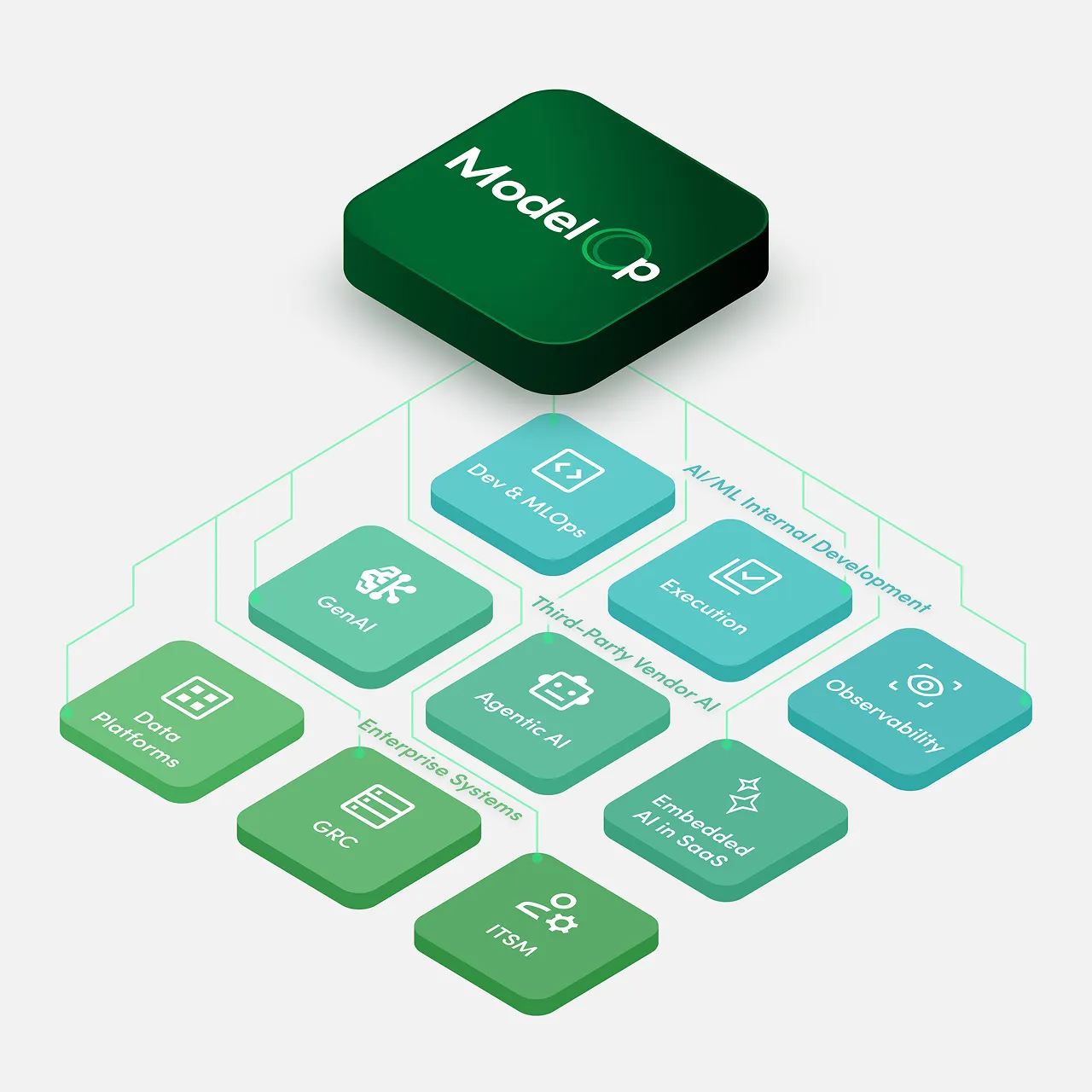
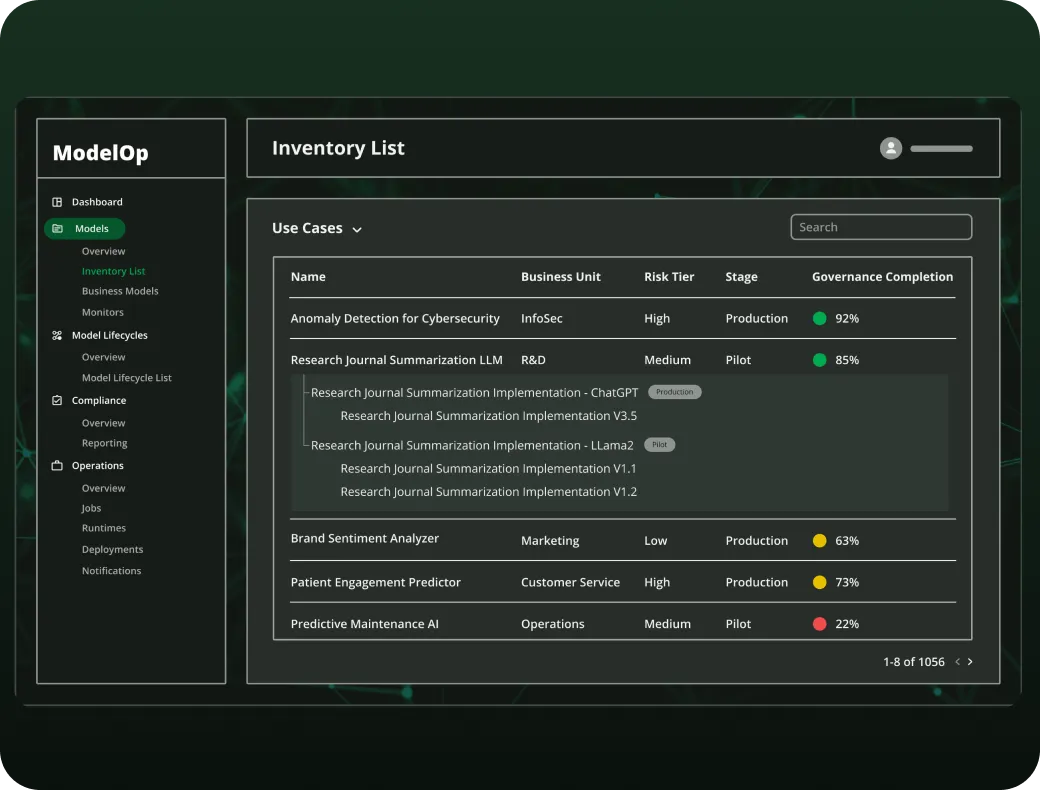
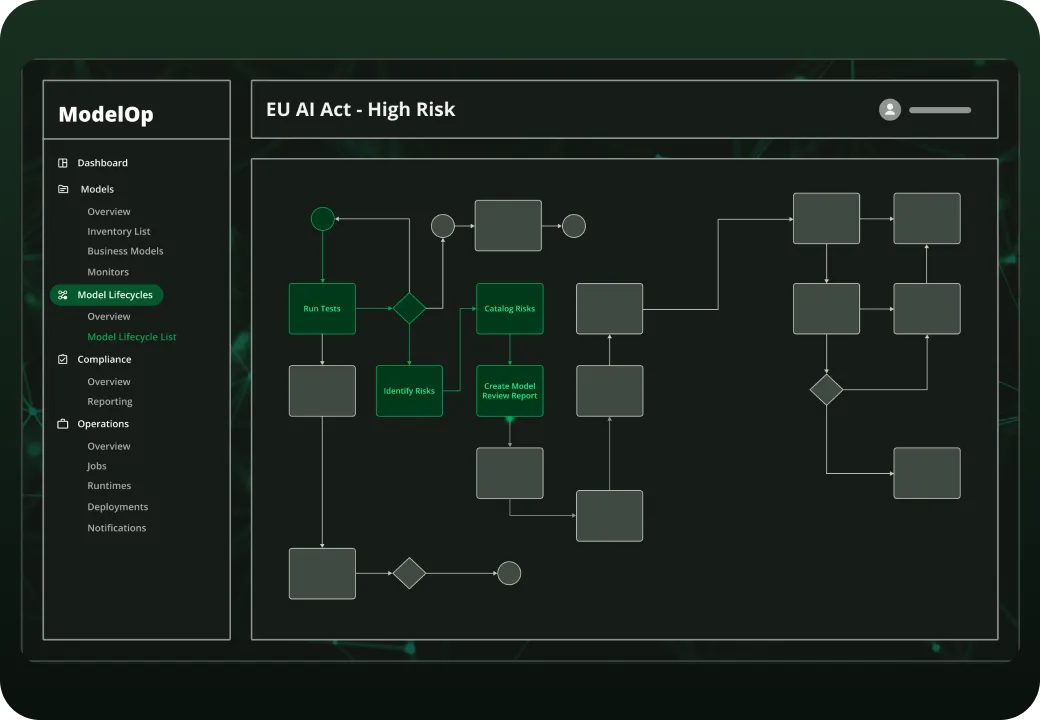
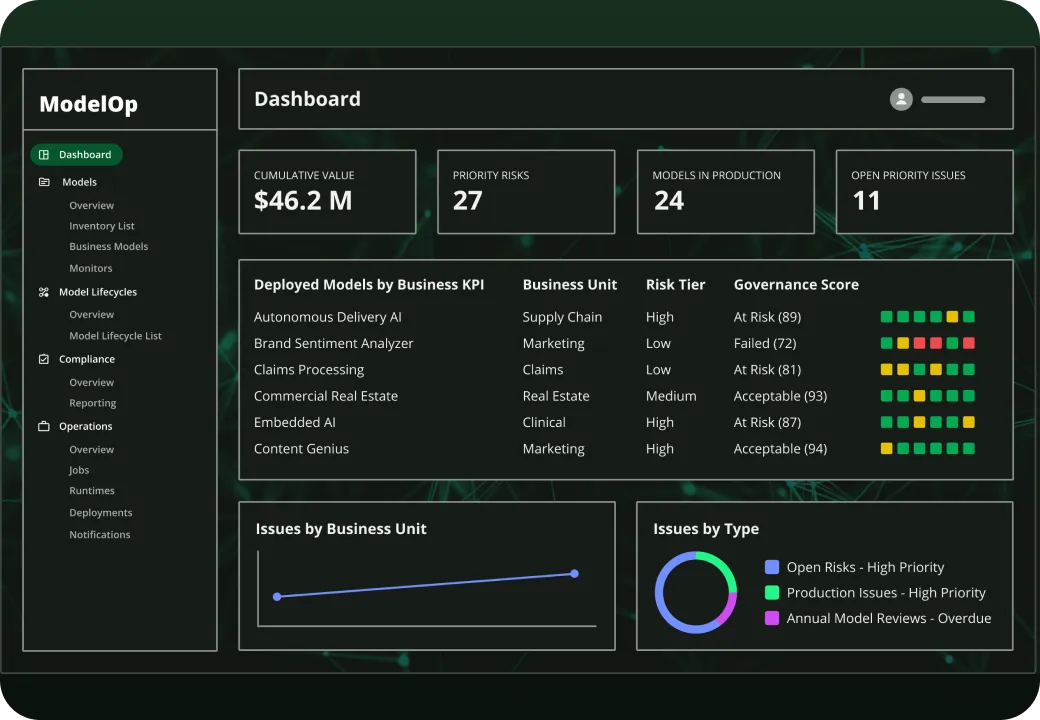
Key features include: Standardize AI use case intake and registration, Initiate the end-to-end AI lifecycle record, Automatically ensure business, risk, and portfolio reviews are conducted, Codify risk assessments for every AI use case, Auto-generate the risk tier for each use case, Auto-generate initial controls based on risk, Track and manage the vendor or internal solution details, Submit candidate AI solution through approval workflows to enforce reviews and policies.
ModelOp is commonly used for: Financial Services, Healthcare, Pharmaceuticals, Biotech, Consumer Packaged Goods Retail, Defense, Government, Public Sector, Chief AI Officer (CAIO), CDAO, CIO, AI Governance Teams Committees.
ModelOp integrates with: AWS SageMaker, Azure Machine Learning, Google Cloud AI, IBM Watson, DataRobot, H2O.ai, Alteryx, Tableau.
Based on user reviews and social mentions, the most common pain points are: token usage, token cost, API costs.

Shopping now starts in ChatGPT.
Oct 23, 2025
Based on 68 social mentions analyzed, 0% of sentiment is positive, 100% neutral, and 0% negative.