The Groq LPU delivers inference with the speed and cost developers need.
Groq is praised for its fast computing capabilities and cost optimization, making it an attractive choice for projects requiring efficient processing. However, specific user reviews are scarce; the limited mentions highlight its use in varied AI applications but lack detailed insights into user satisfaction or complaints. Pricing sentiment isn't directly addressed, but the focus on cost savings suggests a favorable view. Overall, Groq seems to possess a solid reputation for performance, with potential for further user engagement as more detailed feedback surfaces.
Mentions (30d)
9
Reviews
0
Platforms
3
Sentiment
17%
6 positive


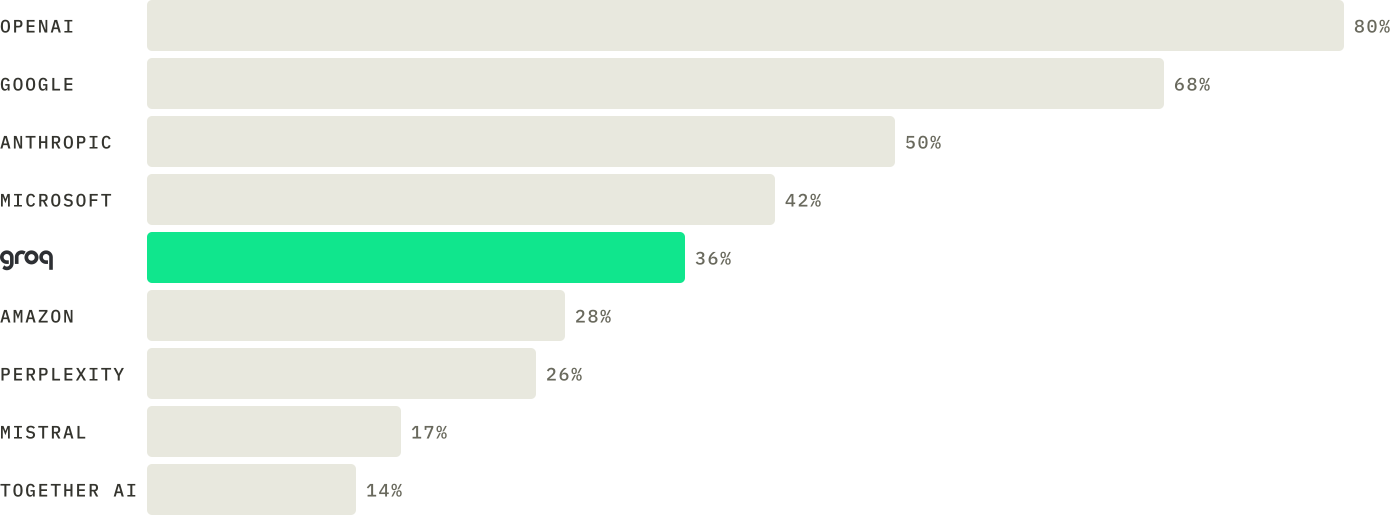



Groq is praised for its fast computing capabilities and cost optimization, making it an attractive choice for projects requiring efficient processing. However, specific user reviews are scarce; the limited mentions highlight its use in varied AI applications but lack detailed insights into user satisfaction or complaints. Pricing sentiment isn't directly addressed, but the focus on cost savings suggests a favorable view. Overall, Groq seems to possess a solid reputation for performance, with potential for further user engagement as more detailed feedback surfaces.
Features
Use Cases
Industry
semiconductors
Employees
350
Funding Stage
Venture (Round not Specified)
Total Funding
$3.3B
Lessons from building a coding agent for 8k context windows: token budgeting, parallel executors, and per-file isolation
Most AI coding tools (Cursor, Aider, Claude Code) assume you have a 200k-token model. If you're running local LLMs through Ollama or LM Studio, or hitting free-tier cloud APIs like Groq or OpenRouter, you've got around 8k tokens to work with. That doesn't fit a whole project, barely fits a single large file. I spent the last few weeks building a CLI coding agent that's designed around the 8k constraint instead of fighting it. Wanted to share what I learned, because some of it surprised me. **The core insight: the LLM never needs to see your whole project.** Most agents try to stuff as much context as possible into a single call. With 8k tokens that's a non-starter. The approach that worked for me is splitting the work into roles: * A **planner** call that only sees a lightweight project map (Markdown summaries of each folder, \~300-500 tokens for the whole project) plus the user's request, and outputs a task list. * **Executor** calls that each see exactly one file plus one task. Never two files in the same call. * An **orchestrator** that's pure code, absolutely no LLM, building a dependency graph between tasks and deciding what runs in parallel vs sequential. This split means the LLM only ever reasons about a small, bounded amount of code at any one time. The planner doesn't need to see code at all (just file summaries), and the executor only sees one file. Multi-file refactors stop being a context-window problem and become a scheduling problem. **Token budgeting has to be enforced in code, not promised in a prompt.** Every LLM call goes through a `canFit()` check that measures: system prompt + reserved output tokens + memory + actual code. If the code doesn't fit, the agent automatically falls back to a per-file line index (generated once for files over \~150 lines) and pulls only the relevant section. Concrete budget math for 8192 tokens: * System prompt + instructions: \~1000 * Reserved for response: \~2000 * Short-term memory (4 entries): \~360 * Available for actual code: \~4800 (about 140-190 lines) **Parallel execution is the speed multiplier that makes 8k usable.** Because each executor sees only one file, independent edits across files can run simultaneously. A 5-file refactor that would be slow if run sequentially completes in roughly the time of the longest single edit. The dependency graph (built in pure code from the planner's task list) decides which tasks have to wait for which. **A few things that tripped me up along the way:** * **Question-style requests overwriting files.** The first version had no concept of read-only operations, so asking "how many lines does X have?" caused the executor to write the answer *into* the file. Fixed by adding an `action_type: "query"` field to the planner's output that routes through a separate code path that never touches disk. * **Stale project maps causing silent misroutes.** If the user named a file in their request that wasn't in the context map (because they just renamed it, or hadn't refreshed), the planner would silently route the action to the closest match. Now the orchestrator validates that mentioned file paths actually exist on disk and throws a clear error if they don't. * **Markdown fences in executor output.** Even when explicitly told not to, smaller models love wrapping code in triple backticks. Strip them in post-processing rather than fighting the prompt. * **Memory token cost.** Initially didn't budget for it; persistent memory is great but it's another \~80-90 tokens per entry that has to come out of the code budget. Now folder context is dropped first when the budget is tight, then memory, before the actual code gets cut. **What I'm still figuring out:** Whether the planner/executor split scales cleanly to codebases over 50 files. The dependency graph stays manageable, but the project map starts costing real tokens once you have enough folders. Currently dropping folder context first when budget is tight, but that means deeper edits get less context. Curious if anyone else has run into this and how they handle it. Open-sourced the implementation if anyone wants to dig in: [https://github.com/razvanneculai/litecode](https://github.com/razvanneculai/litecode)
View originalPricing found: $0.075, $1, $0.30, $1, $0.075
Jonathan Ross (Groq founder) avoided layoffs by asking engineers to take pay cuts for equity — "Groq Bonds"
Groq was three weeks from running out of cash. Founder Jonathan Ross was staring at a list of names his leadership team had put together for layoffs — and realized cutting them would kill the product before it ever hit the technical milestone it needed. Instead of firing people, he pitched something else at an all-hands: keep your job, take a pay cut, take equity instead. They called it "Groq Bonds" internally — not a real bond, just salary swapped for ownership. 80% of the company opted in. Close to half dropped to statutory minimum wage — real money given up by people who normally earn well into six figures. It bought the company roughly two extra months of runway before the next round closed. Worth sitting with: the standard playbook in a cash crunch is to cut people. Ross's bet was to keep the people and cut the cash instead — and let each person decide their own risk tolerance rather than deciding for them. DM for credit or removal request (no copyright intended) © All rights and credits reserved to the respective owner(s). #Groq #EquityVsSalary #StartupSurvival submitted by /u/cen6wkf [link] [comments]
View originalEnsuring 100% Agent Uptime: My setup for a Gemini primary with a Groq/Llama-3 fallback
I've been building autonomous negotiation agents for e-commerce, and one of the biggest bottlenecks I hit was API rate limits or sudden timeouts dropping the connection right in the middle of a customer sale. I wanted to share the try/catch fallback matrix I built to solve this. The Problem: > I need the agent to respond in under 3 seconds to keep the human illusion. If the primary LLM hangs, the sale is lost. The Solution: I wrote a wrapper function for my API calls. It pings Gemini first (since the context window and instruction following for my specific JSON/Image tagging is great). If it throws any error, it immediately falls back to Groq running Llama-3.1. The Prompt Engineering: The hardest part was getting both models to obey strict negotiation rules ("Never go below $X"). I achieved this by feeding the prompt a strict array of tags. If the user asks for a picture, the LLM is instructed to only output: Here is the shoe: [IMG_AIRMAX]. My backend intercepts [IMG_AIRMAX], deletes the text, and swaps it for the real media URL before sending it to the user. Has anyone else built an LLM routing system for their production agents? Curious what fallback models you rely on when your primary goes down. submitted by /u/One-Ad-6028 [link] [comments]
View originalI built a tool that automatically fixes your CLAUDE.md
So, I have been building this with the help of Claude for a while now and I think it turned out pretty well. If you've used Claude Code for more than a few weeks, you've felt this: you write a careful CLAUDE.md, Claude follows it perfectly and then three months later it starts generating wierd code and you can't figure out why. The reason is usually that your CLAUDE.md is lying. The actual paths and structure has changed but it has no idea about it. So, I built driftguard to fix this automatically. It installs a post-commit git hook that watches every commit. When a file referenced in your CLAUDE.md changes significantly, it calls an LLM, generates a surgical diff, and opens a GitHub PR with the fix. Works with any LLM provider: Groq (free tier), Anthropic, Ollama (fully local/free). GitHub: github.com/prateekg7/driftguard Would love feedback on false positive rate as it's the hardest thing to tune. submitted by /u/Mr_Hawkai [link] [comments]
View originalI measured my Claude Code MCP stack on two axes — byte savings AND cache-friendliness. My "best" byte-saver was defeating Anthropic's prompt cache (counter-example + open benchmark)
TL;DR — Single-axis benchmarks for MCPs, compressors, and retrieval layers can recommend a system that's strictly worse in production. The missing axis: cache-friendliness — whether the same input produces byte-identical bytes across runs, so Anthropic's prompt cache hits. In my coding-agent stack, my biggest byte-saver (retrieval MCP, 60–70% reduction) was defeating the 5-min TTL prompt cache on every call. Two runs of the same query produced different bytes because of rg --files-with-matches output order leaking through a Map insertion sequence into the final context. The fix was 2 lines: sort the rg hits before slicing, sort the Map entries by path. Byte savings unchanged, cache_friendly_score went from ~0% to 100%. https://preview.redd.it/x5foipotq93h1.png?width=1600&format=png&auto=webp&s=c0930422e882e23d1fc34ded25934c74db692a21 Article + open benchmark harness: Article: https://gregshevchenko.com/research/mcp-stack-token-economy/ Harness (stdlib-only Python, offline): https://github.com/g-shevchenko/mcp-token-savers — see methods/ for formal definitions, cluster-bootstrap CIs, Wilson CIs, preregistration, real-data Cohen's κ. What the harness measures: mean_ratio + CV across N≥5 runs per fixture → byte-saving axis unique_md5_count == 1 check → cache-friendliness axis (0–100%) 12-anti-pattern audit on tool definitions (DSA reference) What named alternatives publicly disclose: I surveyed the public docs for Cursor codebase index, Sourcegraph Cody, Aider repo-map, Microsoft LLMLingua / LLMLingua-2, Firecrawl / Jina Reader, RouteLLM / Martian (May 2026). https://preview.redd.it/ailemo1wq93h1.png?width=1600&format=png&auto=webp&s=4732f5d03f53ba95d2b5aaac0c7f21f1858a36a4 Limitations: I hypothesized that the prep layer triggers more downstream cache hits on subsequent turns. It didn't reach significance: Welch p=0.32, Cohen's d ≈ 0.18, N=137. Two-judge Cohen's κ on the corpus (cerebras-llama × groq-llama, N=25): κ = 0.5955 (moderate, below the 0.7 substantial threshold). 4 of 5 inter-judge disagreements concentrate on one task with an ambiguous acceptance criterion. Sharpening the spec would push κ to ~0.83. Disclosure: I'm the author. No commercial affiliation with the listed tools. The harness is MIT-licensed and takes any compressor as (str) -> str. Curious what cache_friendly_score looks like on others' Claude Code stacks. submitted by /u/Level_Credit1535 [link] [comments]
View originalMemory
Your explanation is largely correct. The reason “memory” has become the dominant systems problem for LLMs is that modern transformers are increasingly memory-bandwidth bound, not compute-bound. The key shift is this: Training large models was mostly about FLOPs. Serving large models at scale is increasingly about moving KV cache data around fast enough. A single token generation step only performs a relatively modest amount of math compared to the amount of KV data that must be fetched from memory every step. Why this happens During inference, every new token attends to all prior tokens. So for token t, the model needs access to all prior K/V tensors: \text{KV Cache Size} \propto 2 \times L \times S \times H \times d Where: L = layers S = sequence length H = attention heads d = head dimension The killer is the S term. As context grows: 8K → manageable 128K → huge 1M → infrastructure problem A 70B model with long context can require hundreds of GBs of KV cache across concurrent users. Why bandwidth matters more than raw compute Modern GPUs like the NVIDIA H100 or NVIDIA Blackwell can perform enormous amounts of compute. But every generated token requires: Loading KV cache from memory Running attention Writing updated KV back That means inference speed often depends more on: HBM bandwidth memory locality cache management than tensor core throughput. This is why: HBM3E NVLink unified memory memory compression have become strategic bottlenecks. Why the KV cache can exceed model weights Model weights are static. KV cache is dynamic and scales with: users context length output length batch size Example intuition: 70B model weights might occupy ~140 GB FP16 But serving thousands of users with long contexts can require multiple TBs of KV cache So operators increasingly optimize: cache reuse eviction paging quantization instead of just model size. Why vLLM and PagedAttention mattered so much Before systems like vLLM, memory fragmentation was catastrophic. PagedAttention essentially borrowed ideas from operating systems: divide KV into pages allocate dynamically avoid contiguous memory assumptions That dramatically improved: utilization batching throughput This was one of the biggest inference infrastructure breakthroughs of the last few years because it improved economics without changing the model itself. The deeper issue: transformers scale poorly with context Standard attention fundamentally has a retrieval problem: Each token potentially references every prior token. Even though compute optimizations exist, the architecture still requires huge memory movement. That’s why researchers are exploring: Grouped Query Attention (GQA) Multi-Query Attention (MQA) sliding window attention recurrent memory state-space models hybrid retrieval systems The industry increasingly believes: infinite-context transformers using naive KV scaling are economically unsustainable. Why inference economics are now the focus Training frontier models is expensive. But operating them continuously at global scale is potentially even larger economically. For many providers: inference cost dominates memory dominates inference cost That’s why companies across the stack are racing on memory: NVIDIA → HBM + NVLink + Grace AMD → MI300 unified memory Cerebras → wafer-scale SRAM Groq → deterministic low-latency SRAM-heavy architecture Marvell Technology → custom memory fabrics The bottleneck has shifted from: “Can we train bigger models?” to: “Can we serve them cheaply and fast enough?” submitted by /u/Annual_Judge_7272 [link] [comments]
View originalI built my own GTA 6 (but it's 2d pixelart and 100% AI) with Claude
Working on a fully AI native online game similar to gta online but in habbo hotel style and all content is live AI generated! Players can create own characters, weapons, buildings in the shared universe and raid others players homes! About the tech & how Claude helped: I use different AI apis like OpenAI, groq, gemini to generate the live in-game sprites. For the actual game development, I primarily used Claude and Claude Code (alongside Unity and Cursor). Claude wrote the core C# game logic, helped structure the multiplayer networking, and integrated the various AI APIs into the game engine. If you are interested, you can join the discord to try the completely free first demo: https://discord.gg/BFqQZHhkv6 submitted by /u/SneakerHunterDev [link] [comments]
View originalI built gta online but in 2d and everything is AI-native
I’ve been building a multiplayer 2D pixel-art sandbox game using Unity + Claude Code. The idea is basically “GTA Online meets Habbo Hotel,” except almost everything in the world is generated dynamically with AI: - buildings - characters - weapons - animations - item sprites Players earn gold in different ways, build bases/businesses, and can raid other players for resources. Claude Code has been especially useful for: - generating Unity systems and gameplay scripts - refactoring networking/game-state logic - debugging procedural generation issues - helping structure the AI content pipeline - rapidly iterating on UI/gameplay ideas For asset generation I’m currently using APIs from OpenAI, Gemini, and Groq. The game is still early/in-progress, but you can try it here: https://discord.gg/w24aaRpfsV Would love feedback from other people building AI-assisted games. submitted by /u/SneakerHunterDev [link] [comments]
View original[P] QLoRA Fine-Tuning of Qwen2.5-1.5B for CEFR English Proficiency Classification (A1–C2) [P]
I fine-tuned Qwen2.5-1.5B for multi-class CEFR English proficiency classification using QLoRA (4-bit NF4). The goal was to classify English text into one of the 6 CEFR levels (A1 → C2), which can be useful for: adaptive language learning systems, placement testing, readability estimation, educational NLP applications. Dataset The dataset contains 1,785 English texts balanced across: 6 CEFR levels, 10 domains/topics. The samples were synthetically generated using: Groq API Llama-3.3-70B Generation constraints were designed to preserve: vocabulary complexity, grammatical progression, sentence structure variation, CEFR-specific linguistic patterns. Training Setup Base model: Qwen2.5-1.5B Fine-tuning method: QLoRA 4-bit NF4 quantization LoRA adapters Only ~0.28% of model parameters were trained. Results Held-out test set: 179 samples Metrics: Accuracy: 84.9% Macro F1: 84.9% Per-level recall: Level Recall A1 96.6% A2 90.0% B1 90.0% B2 86.7% C1 86.7% C2 60.0% Most errors come from C1/C2 confusion, which is expected due to the subtle linguistic boundary between those levels. Deployment I also built: a FastAPI inference API, Docker deployment setup. Example Usage from transformers import AutoModelForSequenceClassification, AutoTokenizer import torch model = AutoModelForSequenceClassification.from_pretrained( "yanou16/cefr-english-classifier" ) tokenizer = AutoTokenizer.from_pretrained( "yanou16/cefr-english-classifier" ) text = "Artificial intelligence is transforming many industries." inputs = tokenizer(text, return_tensors="pt") with torch.no_grad(): outputs = model(**inputs) pred = outputs.logits.argmax(dim=-1).item() print(pred) Feedback is welcome, especially regarding: evaluation methodology, synthetic data quality, improving C2 classification performance, better benchmarking approaches. submitted by /u/Professional-Pie6704 [link] [comments]
View originalLLM proxy that lets Claude Code talk to any model
I built rosetta-llm — an open-source multi-format LLM proxy that acts as a drop-in Claude Code gateway. Works as a Claude Code LLM gateway — set `ANTHROPIC_BASE_URL` and all configured models appear in `/model` picker Translates between formats — Anthropic Messages ↔ OpenAI Chat ↔ OpenAI Responses at the wire level Thinking blocks round-trip correctly — this is the hard part and why I built this Provider routing — `openai/gpt-5.4`, `anthropic/claude-opus-4-7`, `groq/llama-4` all through one endpoint Streaming on everything — passthrough fast path + cross-format translation with proper SSE handling The thinking-block problem Most proxies lose reasoning continuity. LiteLLM has had open PRs for thinking block handling for a long time — some dating back months — and they're still not merged. Without proper round-tripping, prompt caching breaks across turns and Claude Code loses context. Rosetta encodes encrypted reasoning into Anthropic's `signature` field and decodes it back — so multi-turn agentic workflows keep their prompt-cache hits. Zero-setup Hugging Face Space Literally a two-line Dockerfile: FROM ghcr.io/lokesh-chimakurthi/rosetta-llm:latest COPY --chown=app:app config.json /app/config.json Add config.json file and above Dockerfile into a HF Space (Docker SDK) and it's running. No clone, no build, no venv. The GHCR image has everything baked in. Make your HF space private and add api keys in hf space secrets. Check readme in github Also works with # No install — ephemeral uvx rosetta-llm # Persistent install uv tool install rosetta-llm rosetta-llm --config ~/.rosetta-llm/config.json # Docker docker run -p 7860:7860 \ -v ~/.rosetta-llm/config.json:/app/config.json \ ghcr.io/lokesh-chimakurthi/rosetta-llm:main Why another proxy? I looked at existing solutions: LiteLLM — thinking block round-trip PRs going nowhere, too many abstractions OpenRouter — great but closed-source, no self-hosting Direct passthrough proxies — don't translate between formats Nothing gave me lossless cross-format translation with proper reasoning fidelity. Links GitHub: https://github.com/Lokesh-Chimakurthi/rosetta-llm PyPI: https://pypi.org/project/rosetta-llm/ Contributions welcome I built this for myself and it works for my use cases. But there's a lot more it could do — better multimodal handling, embeddings support, rate limiting, an admin UI. If any of this sounds interesting, PRs are absolutely welcome. Happy to answer questions in the comments. submitted by /u/DataNebula [link] [comments]
View originalIDK why the chat-apps don't have this thing!!
I shipped a side project: QuotePin, an AI chat app with inline annotations to reduce "clarification clutter." The problem: In ChatGPT/Claude-style chats, small follow-ups ("define X", "what does this sentence imply?", "what is Y?") become full messages. After a while, the conversation is 60% main thread and 40% you going "sorry, one more quick question." It's basically a support ticket at that point. What QuotePin does instead: you select a word or phrase in an AI response, ask your question in a pop-up, and the answer is saved as an annotation attached to the original context. Think Wikipedia-style reading, where the main flow stays readable, and you only expand details where needed, instead of derailing the whole thread because you didn't know what "idempotent" meant. Features: Inline annotate: select text → ask → saved badge on the message Optional "reply in chat" for larger follow-ups that actually deserve to exist Conversation graph view for overview/sharing Bookmarks. This came from a specific pain point: I'd ask the AI to give me a list of questions, reply with my doubts for each one, and by the time I was done, the original question list had scrolled so far up I had to hunt for it every time. Bookmarks let you pin that message and jump back instantly. Multi-provider support (OpenAI/Anthropic/Gemini/Groq/Qwen) using your own API key No paid API key? Groq has a free tier that works great for this. Get started in 30 seconds: Go to console.groq.com and grab a free API key Open QuotePin and head to Settings Select Groq as your provider Paste your key and you're good to go I'm not a product/UX person (I live in the low-level systems part of the brain where there are no users, only registers). So I'd genuinely love feedback, especially on the annotation UX and what would make it useful in real workflows, not just in my head. Live: https://quotepin.vercel.app/ Repo: https://github.com/aayuxh-vim/QuotePin submitted by /u/Chessislove [link] [comments]
View originalI built a router that automatically sends your AI tasks to the most appropriate model to handle them at low cost - 9,200 tasks in, $21 saved at $0.14 actual cost
The observation that started this: most of what people use AI for every day - summarising, drafting, classifying, extracting etc doesn't actually require a frontier model. Any competent 8-70B model handles those just as well. But most people run everything through Claude or ChatGPT out of habit. I built Followloop (followloop.app) to solve this automatically. It classifies each task by complexity and routes it: - Simple tasks → Cerebras Llama (2000 TPS, 1M tokens/day free), Groq, Gemini Flash - Moderate tasks → Groq 70B, SambaNova - Complex tasks → Claude Haiku as fallback The dashboard shows your actual cost alongside what you'd have paid running everything on Claude Sonnet. I've been running it on my own AI workflow for two weeks: 9,200 tasks routed, $21.24 saved, $0.1360 actual cost. About 157× cheaper per token than Sonnet on average. Works with any AI setup via MCP (Model Context Protocol) - Claude Desktop, Cursor, Claude Code, or anything MCP-compatible. Also has a library of 1,300+ safety-screened MCP servers as a bonus feature. $5/month at followloop.app submitted by /u/QueefLatinahOG [link] [comments]
View originalSomeone just open-sourced a hedge fund
submitted by /u/YogurtWild [link] [comments]
View originalLessons from building a coding agent for 8k context windows: token budgeting, parallel executors, and per-file isolation
Most AI coding tools (Cursor, Aider, Claude Code) assume you have a 200k-token model. If you're running local LLMs through Ollama or LM Studio, or hitting free-tier cloud APIs like Groq or OpenRouter, you've got around 8k tokens to work with. That doesn't fit a whole project, barely fits a single large file. I spent the last few weeks building a CLI coding agent that's designed around the 8k constraint instead of fighting it. Wanted to share what I learned, because some of it surprised me. **The core insight: the LLM never needs to see your whole project.** Most agents try to stuff as much context as possible into a single call. With 8k tokens that's a non-starter. The approach that worked for me is splitting the work into roles: * A **planner** call that only sees a lightweight project map (Markdown summaries of each folder, \~300-500 tokens for the whole project) plus the user's request, and outputs a task list. * **Executor** calls that each see exactly one file plus one task. Never two files in the same call. * An **orchestrator** that's pure code, absolutely no LLM, building a dependency graph between tasks and deciding what runs in parallel vs sequential. This split means the LLM only ever reasons about a small, bounded amount of code at any one time. The planner doesn't need to see code at all (just file summaries), and the executor only sees one file. Multi-file refactors stop being a context-window problem and become a scheduling problem. **Token budgeting has to be enforced in code, not promised in a prompt.** Every LLM call goes through a `canFit()` check that measures: system prompt + reserved output tokens + memory + actual code. If the code doesn't fit, the agent automatically falls back to a per-file line index (generated once for files over \~150 lines) and pulls only the relevant section. Concrete budget math for 8192 tokens: * System prompt + instructions: \~1000 * Reserved for response: \~2000 * Short-term memory (4 entries): \~360 * Available for actual code: \~4800 (about 140-190 lines) **Parallel execution is the speed multiplier that makes 8k usable.** Because each executor sees only one file, independent edits across files can run simultaneously. A 5-file refactor that would be slow if run sequentially completes in roughly the time of the longest single edit. The dependency graph (built in pure code from the planner's task list) decides which tasks have to wait for which. **A few things that tripped me up along the way:** * **Question-style requests overwriting files.** The first version had no concept of read-only operations, so asking "how many lines does X have?" caused the executor to write the answer *into* the file. Fixed by adding an `action_type: "query"` field to the planner's output that routes through a separate code path that never touches disk. * **Stale project maps causing silent misroutes.** If the user named a file in their request that wasn't in the context map (because they just renamed it, or hadn't refreshed), the planner would silently route the action to the closest match. Now the orchestrator validates that mentioned file paths actually exist on disk and throws a clear error if they don't. * **Markdown fences in executor output.** Even when explicitly told not to, smaller models love wrapping code in triple backticks. Strip them in post-processing rather than fighting the prompt. * **Memory token cost.** Initially didn't budget for it; persistent memory is great but it's another \~80-90 tokens per entry that has to come out of the code budget. Now folder context is dropped first when the budget is tight, then memory, before the actual code gets cut. **What I'm still figuring out:** Whether the planner/executor split scales cleanly to codebases over 50 files. The dependency graph stays manageable, but the project map starts costing real tokens once you have enough folders. Currently dropping folder context first when budget is tight, but that means deeper edits get less context. Curious if anyone else has run into this and how they handle it. Open-sourced the implementation if anyone wants to dig in: [https://github.com/razvanneculai/litecode](https://github.com/razvanneculai/litecode)
View originalBuilt an open-source proxy that saves ~30% on API tokens while keeping response quality — free, looking for beta testers
I've been building **compresh**, an open-source proxy that sits between your app and the OpenAI API. You swap `base_url`, and it optimizes your requests before they hit the API. **Two layers of optimization:** **Rule-based prompt compression** — strips filler words, verbose phrases, redundant instructions. Sub-millisecond, no ML involved. Works in 6 languages. **Conversation-aware context compression** — for multi-turn chats, it builds a semantic understanding of the conversation and replaces older turns with a compact context block. Instead of sending 50 turns of raw history, your model gets the essential context in a fraction of the tokens. **Why not just summarize?** Summarization requires an extra LLM call (cost + latency). Compresh's scoring and compression is deterministic and rule-based. The only ML component is a lightweight tag extraction step, and even that runs on a small model. More importantly: summaries lose corrections. If a user corrects themselves mid-conversation, a summary might keep the wrong version. Compresh explicitly tracks these corrections and preserves them through compression. **Net result:** ~30% token savings on multi-turn conversations, with response quality on par or better than no compression (validated on benchmarks). The model also stays in-context longer because you're using the context window more efficiently. It works with any OpenAI-compatible endpoint — not just OpenAI. Groq, Mistral, local models, anything. Free, open source: github/compresh/compresh Edit: Fixed product name typos. submitted by /u/talatt [link] [comments]
View originalI built a local-first MCP server that gives Claude Code persistent memory, a knowledge graph, and a consent framework — and Claude is just the first client
I've been building this for a couple of years. It started as "what if my AI assistant actually remembered things," and it became something bigger. The short version: I built a local AI infrastructure layer that runs entirely on my machine. No cloud. No exposed ports. My data stays on my hardware. And this week it's finally at a point where I can share it. --- What it is willow-1.7 is a Model Context Protocol server. Claude Code connects to it at session start via stdio — no HTTP, no ports, no supervisor. A direct pipe. Through that connection, Claude gets 44 tools: - Persistent memory — a Postgres knowledge graph (atoms, entities, edges) that survives sessions - Local storage — SQLite per collection, with a full audit trail and soft-delete - Inference routing — local Ollama first, then Groq / Cerebras / SambaNova as free-tier fallback if Ollama is down - Task queue — Claude submits shell tasks to Kart, a worker that polls Postgres and executes them - SAFE authorization — every agent that wants knowledge graph access must present a GPG-signed manifest. No valid signature = access denied. Revoke an agent by deleting its folder. The filesystem is the ACL. - Session handoffs — structured handoff documents written to disk and indexed in Postgres, so the next session can pick up from where the last one ended --- The authorization model This part is unusual enough that it's worth explaining. Each application that wants to access the knowledge graph has a folder on a separate partition (/media/willow/SAFE/Applications/ /). That fo - safe-app-manifest.json — declares permissions and data streams - safe-app-manifest.json.sig — a GPG detached signature of the manifest On every access attempt, the gate checks: folder exists → manifest present → signature present → gpg --verify passes. All four must pass. Any failure → deny + log. No code changes to revoke access. Delete the folder, and that agent is done. I've been running 17 AI professors through this gate for months. Each one has its own signed folder, its own permitted data streams, its own context. None of them can access data outside their declared scope. --- What powers it locally Ollama runs the inference. Currently using qwen2.5:3b as the default. The system routes there first and falls back to free cloud APIs only if Ollama is unavailable. But Claude is just the first client. The MCP server speaks stdio MCP. Any agent that understands the protocol can connect — Gemini, local models, anything. The longer plan: Yggdrasil. A small model trained on the operational patterns this system generates — session handoffs, ratified knowledge atoms, governance logs. When that model is trained, it replaces the cloud fleet entirely. The system becomes fully air-gappable. And after that: an open-source Claude Code equivalent. A terminal AI agent that boots from your local repo, connects to willow via stdio, and has no dependencies you don't control. No telemetry. No cloud account required. Just you and the tools you built. willow-1.7 is the bus everything else rides. The client is just the first thing attached to it. --- Why local-first matters to me I have two daughters. I'm building this so they grow up with tools that help them think instead of thinking for them. That don't own their journals. That don't optimize their attention. That expire when they close the app. The current model is: agree once, we own everything forever. Your notes train our models. Your data lives in our building. Local-first is the other way. Your data lives on your machine. Consent is session-based — the system asks every time, and that permission expires when you're done. If you walk away, it stops. --- The bootstrap There's a separate installer repo, willow-seed, that handles the full setup from scratch — clones the repo, creates the Postgres database, scaffolds the first SAFE agent entry, writes the MCP config. Stdlib only, no dependencies. Consent gates before every action. python seed.py That's it. Tested it this week on a fresh partition. It works. --- Links - willow-1.7: https://github.com/rudi193-cmd/willow-1.7 - willow-seed: https://github.com/rudi193-cmd/willow-seed - SAFE spec: https://github.com/rudi193-cmd/SAFE --- Happy to answer questions. Still building. ΔΣ=42 submitted by /u/BeneficialBig8372 [link] [comments]
View originalYes, Groq offers a free tier. Pricing found: $0.075, $1, $0.30, $1, $0.075
Key features include: javascript, What inference provider are you using or considering using to access models?, Groq Raises $750 Million as Inference Demand Surges, Day Zero Support for OpenAI Open Models, From Speed to Scale: How Groq Is Optimized for MoE Other Large Models, Platform Solutions, Learn, Developers.
Groq is commonly used for: Groq runs the models you care about., Support for LLMs, STT, TTS, and image-to-text models, Popular models on-demand, Industry standard frameworks and integrations, Custom Models, Regional Endpoint Selection.
Groq integrates with: OpenAI, AWS Lambda, Google Cloud, Azure, Kubernetes, Docker, Jupyter Notebooks, GitHub.
Based on user reviews and social mentions, the most common pain points are: token cost, API costs, cost tracking.
LM Studio
Project at LM Studio
1 mention
Based on 35 social mentions analyzed, 17% of sentiment is positive, 80% neutral, and 3% negative.